Outline · 8 sections
The PokéAPI demo started as a small excuse to do something silly on the portfolio: a sprite that wanders around the window and can be clicked to reveal its details. Silly, but it forced a few decisions that turned out to be useful practice — proxying a third-party API, shaping the response before it reaches the browser, and keeping a small interactive widget from turning the whole site into a client-side app.
The problem with calling PokéAPI from the browser
The obvious implementation is a fetch straight to pokeapi.co from a client
component. It works, and it is the wrong shape for this project:
- the payload for a single Pokémon is large — moves, game indices, version groups, encounter tables — and almost none of it is displayed
- the sprite URLs come back as a nested
spritesobject where several entries can benull - an upstream failure surfaces as a broken image with no explanation
So the browser never talks to PokéAPI directly. It talks to two route handlers in this app, which talk to PokéAPI and return exactly the fields the UI needs.
Two endpoints, two jobs
The widget needs a random Pokémon and, later, the details of the one that was caught. Those are separate endpoints on purpose:
GET /api/pokemon/random   → { id, name, sprite, types }
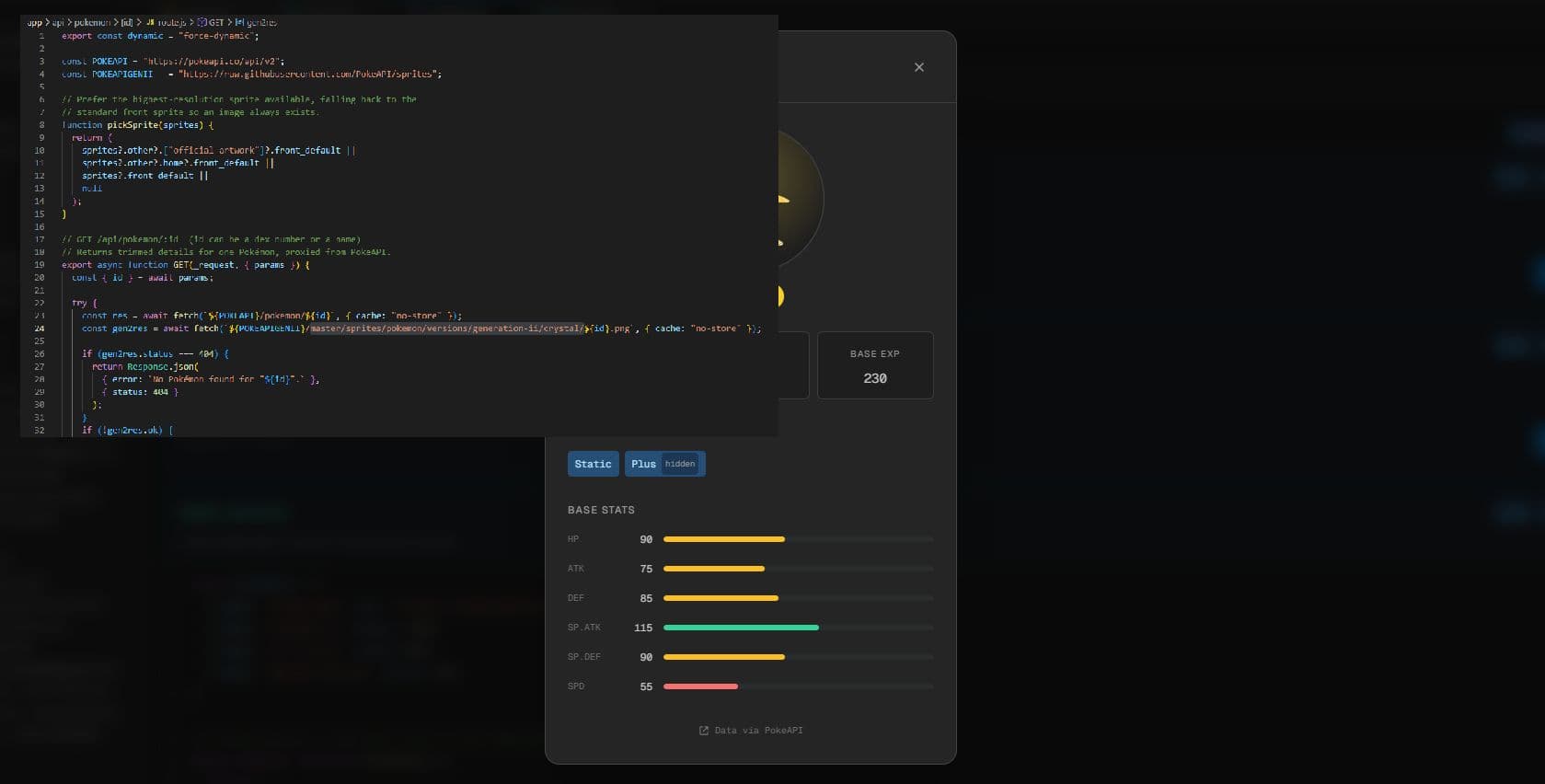
GET /api/pokemon/:id      → height, weight, base EXP, abilities, stats
The first keeps its payload to four fields. The second is only ever hit after
the details modal opens, and it accepts either a dex number or a name, so
/api/pokemon/pikachu works as well as /api/pokemon/25.
Both are marked request-time so nothing is cached into a prerendered shell:
// app/api/pokemon/random/route.js
export const dynamic = "force-dynamic";The random endpoint does more than pick a number
Randomness is one line. What takes the rest of the handler is making sure the result always has an image. The pick is deliberately narrow: ids 152–251, the Gen II range, because those are the Crystal sprites the route is set up to clean. Every id in that range is a real entry, so the draw itself is straightforward — but the sprite that comes back has to be checked and normalised before it is returned.
// app/api/pokemon/random/route.js
export async function GET() {
  try {
    const id = Math.floor(Math.random() * 100) + 152;
    const gen2Sprite = await gen2SpriteTransparent(id);

    const pokemonRes = await fetch(`${POKEAPI}/pokemon/${id}`, {
      cache: "no-store",
    });
    if (!pokemonRes.ok) {
      throw new Error(`PokeAPI pokemon request failed: ${pokemonRes.status}`);
    }
    const pokemon = await pokemonRes.json();

    return Response.json({
      id: pokemon.id,
      name: pokemon.name,
      sprite: gen2Sprite || pickSprite(pokemon.sprites),
      types: pokemon.types.map((t) => t.type.name),
    });
  } catch (err) {
    console.error("[/api/pokemon/random]", err);
    return Response.json(
      { error: "Could not catch a random Pokémon. Please try again." },
      { status: 502 },
    );
  }
}Next 16 changed how params works
This one cost me a debugging session. In Next.js 16 the dynamic route segment is a Promise, so the value cannot be read synchronously any more:
// app/api/pokemon/[id]/route.js
export async function GET(_request, { params }) {
  const { id } = await params; // not `params.id`
  // ...
}
The await is the whole fix. The upside of the change is that the same shape
now applies to pages, layouts and route handlers, so there is only one rule to
remember.
The detail route also asks the sprite host for that Pokémon's Crystal PNG. It
never returns it — a 404 there is a cheap, unambiguous way to tell that the
id or name the caller passed doesn't exist, so the route can answer with a real
404 instead of a generic 502.
Making the Gen II sprite usable
The Crystal-era sprites are charming, but they ship as a small image on an
opaque white square. Dropped onto a dark background, that square looks like a
bug. Rather than pull in a second image pipeline, the route fetches the PNG
from the PokeAPI sprites repo, decodes it with sharp, edits the raw pixels in
memory, and re-encodes a fresh PNG before returning it:
- Flood fill from the edges. Near-white pixels reachable from the border become transparent. Enclosed white areas — bellies, eyes, highlights — survive, because the flood never reaches them.
- Peel the fringe. Repeated passes over the remaining white pixels — up to six, stopping early once a pass changes nothing — remove the anti-aliased halo that touches the now-transparent background, so there is no white outline left behind.
const isWhite = (o) =>
  data[o] >= 244 && data[o + 1] >= 244 && data[o + 2] >= 244;
The result is a PNG data URI, which means the browser gets a transparent sprite with no extra request and no storage:
return `data:image/png;base64,${png.toString("base64")}`;The roaming sprite
The sprite is deliberately not part of the page layout. It is rendered once on
/projects, and paints itself as a fixed positioned element that glides
between random waypoints — paused while hovered or while its details modal is
open:
// components/pokemon/PokemonCard.jsx
// A waypoint inside the editor area: below the tabs, above the status bar,
// and always far enough from an edge that the sprite can't clip.
function randomSpot() {
  if (typeof window === "undefined") return { x: 24, y: 160 };
  const { innerWidth: w, innerHeight: h } = window;
  return {
    x: Math.round(16 + Math.random() * Math.max(1, w - SPRITE - 32)),
    y: Math.round(150 + Math.random() * Math.max(1, h - SPRITE - 90)),
  };
}

// CSS transition duration scaled by distance: short hops stay snappy,
// long journeys across the viewport take their time.
const dist = Math.hypot(next.x - cur.x, next.y - cur.y);
const duration = Math.round(Math.min(8000, Math.max(2400, dist * 15)));
A few practical notes from this part:
- Keep waypoints inside the chrome. The window has a title bar, a tab strip
and a status bar, so the spot is generated with a
150pxtop floor and a90pxbottom margin instead of a raw0–innerHeightrange. - Set the position on the client only. The initial position comes from a
useEffect, which keeps the server-rendered HTML and the first client render identical — no hydration mismatch, no flash of a sprite in the corner. - Freeze before you click. A moving target is a frustrating button. The
first
mouseenterortouchstartsnaps the sprite to its currentgetBoundingClientRect()and zeroes the transition, so the click lands where the sprite actually is instead of where it used to be. - Dwell, don't dash. Every glide is followed by a 0.9–3.5s pause at the new waypoint, and the first wander waits 1.4s after the sprite has popped in. Without the pauses it reads as a screensaver rather than a creature.
- Give every request a visible state. While the catch is in flight the sprite becomes a spinning Pokéball; if it fails, it becomes a small retry button that re-runs the same handler. A decoration that fails silently is worse than one that isn't there.
Details on demand
Clicking the sprite doesn't navigate or prefetch anything. It mounts
PokemonModal, the only other client component in the pair and the only thing
that ever calls GET /api/pokemon/:id:
// components/pokemon/PokemonModal.jsx
const detailCache = new Map();

async function fetchDetails(id) {
  if (detailCache.has(id)) return detailCache.get(id);
  const res = await fetch(`/api/pokemon/${id}`);
  if (!res.ok) throw new Error(`Request failed (${res.status})`);
  const data = await res.json();
  detailCache.set(id, data);
  return data;
}
Three details are worth calling out:
- Cache per id. Catching another Pokémon and then re-opening one you have
already viewed is instant — a module-level
Mapkeeps the last response. - Guard against out-of-order responses. A request-id ref is bumped on every load, and a response is only committed if it still matches the newest request, so a slow first call can't overwrite a fast second one.
- Close everywhere, stack correctly. Backdrop click and
Escapeboth close the dialog, and the modal renders above the sprite (z-index 3000 vs 2000), so it is never clipped by the thing that opened it.
The body is mostly presentation: type badges tinted with the same palette the
sprite's halo uses, height/weight/base EXP, abilities with a hidden tag, and
base stats drawn as bars whose colour shifts from red to amber to green at 60
and 100. Height and weight leave PokéAPI in decimetres and hectograms, so the
shared helpers in components/pokemon/pokemon.js convert them to metres and
kilograms once, instead of at every call site.
What I'd keep from this
The whole feature is a decoration, and the architecture around it is still worth reusing: a proxy that trims upstream data, a second endpoint that is only called on demand, an error path that degrades to a known-good value, and a widget that keeps all of its interactivity inside two client components while the page around it stays server-rendered.